Appendix-01.Threading_in_Python
What is Threading
Threading in Python is a technique used to achieve concurrent execution by running multiple threads—smaller units of a process—simultaneously or in an overlapping manner.
-
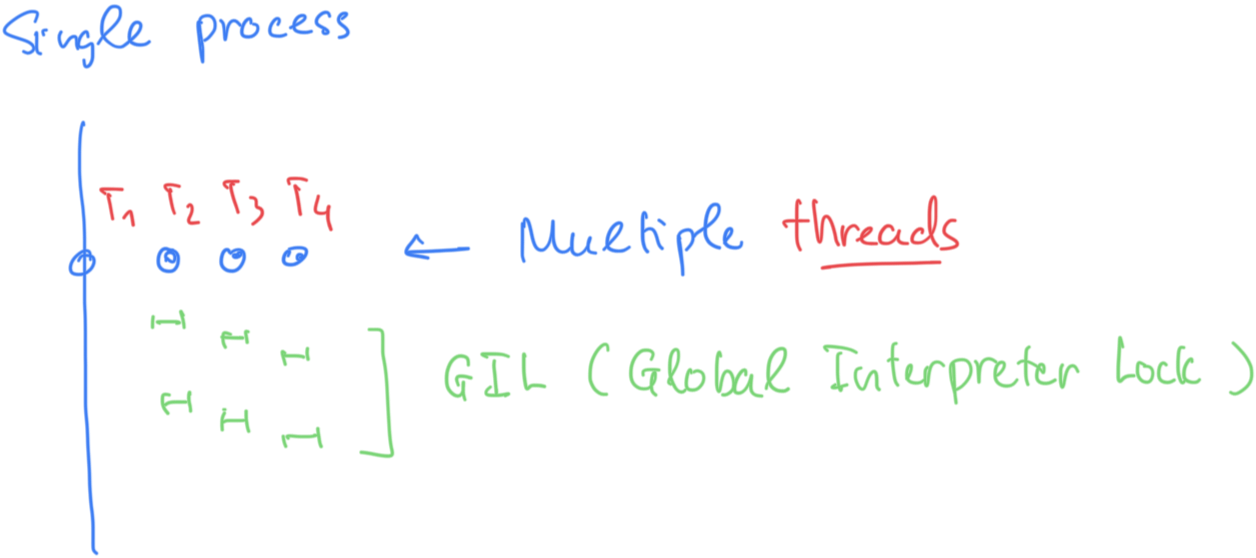
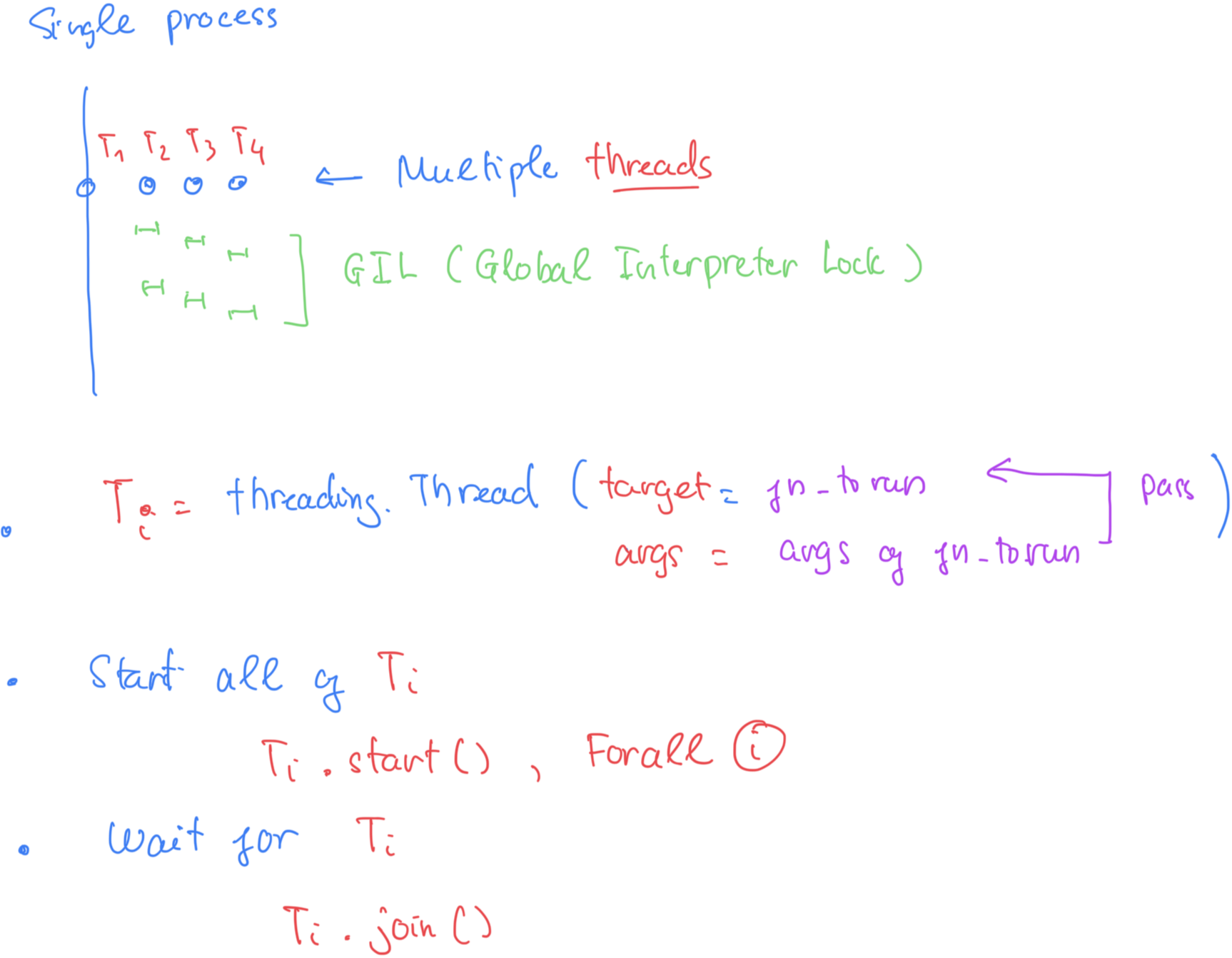
Single Process: All threads (T1, T2, T3, T4) operate within a single Python process, as the diagram correctly shows with the large vertical line encompassing everything.
-
The Global Interpreter Lock (GIL): The diagram visually represents the GIL as a single lock mechanism that all threads must contend for to execute Python bytecode.
-
No True Parallelism (for CPU-bound tasks): The key takeaway, which the diagram illustrates, is that even with multiple threads available, only one thread can hold the lock and execute code at any given moment. This effectively serializes the execution of CPU-bound threads, preventing them from running in parallel across multiple CPU cores. The small green blocks show threads taking turns executing brief bursts of work
import threading
import time
import os

def cpu_intensive_task(count_to):
    """A function that performs a CPU-bound operation."""
    # print(f"Thread {threading.current_thread().name} starting on PID {os.getpid()}")
    while count_to > 0:
        count_to -= 1
    # print(f"Thread {threading.current_thread().name} finished.")

def run_single_threaded(iterations, count_target):
    """Runs the task once in the main thread."""
    start_time = time.time()
    for _ in range(iterations):
        cpu_intensive_task(count_target)
    end_time = time.time()
    print(f"--- Single-threaded execution time for {iterations} task(s): {end_time - start_time:.4f} seconds ---")

def run_multi_threaded(num_threads, count_target):
    """Runs the task using multiple threads."""
    start_time = time.time()
    threads = []

    for i in range(num_threads):
        # Pass the task to a new thread
        t = threading.Thread(target=cpu_intensive_task, args=(count_target,), name=f"Thread-{i}")
        threads.append(t)
        t.start()

    # Wait for all threads to complete their work
    for t in threads:
        t.join()

    end_time = time.time()
    print(f"--- Multi-threaded ({num_threads} threads) execution time: {end_time - start_time:.4f} seconds ---")

if __name__ == "__main__":
    # Define parameters for the demo
    TARGET_COUNT = 50000000 # The number of operations each 'task' performs
    NUM_THREADS = 4        # The number of threads (like T1-T4 in your diagram)

    print(f"System has {os.cpu_count()} CPU cores available.")

    print("\nStarting single-threaded demo...")
    # We run 4 tasks sequentially to match the total work done by the multi-threaded example
    run_single_threaded(NUM_THREADS, TARGET_COUNT)

    print("\nStarting multi-threaded demo (demonstrating GIL serialization)...")
    # We run 4 threads concurrently
    run_multi_threaded(NUM_THREADS, TARGET_COUNT)

    print("\nObservation: The execution times are very similar, confirming that threads in Python's CPython interpreter cannot run CPU-bound tasks in parallel.")
Thread Lifecycle
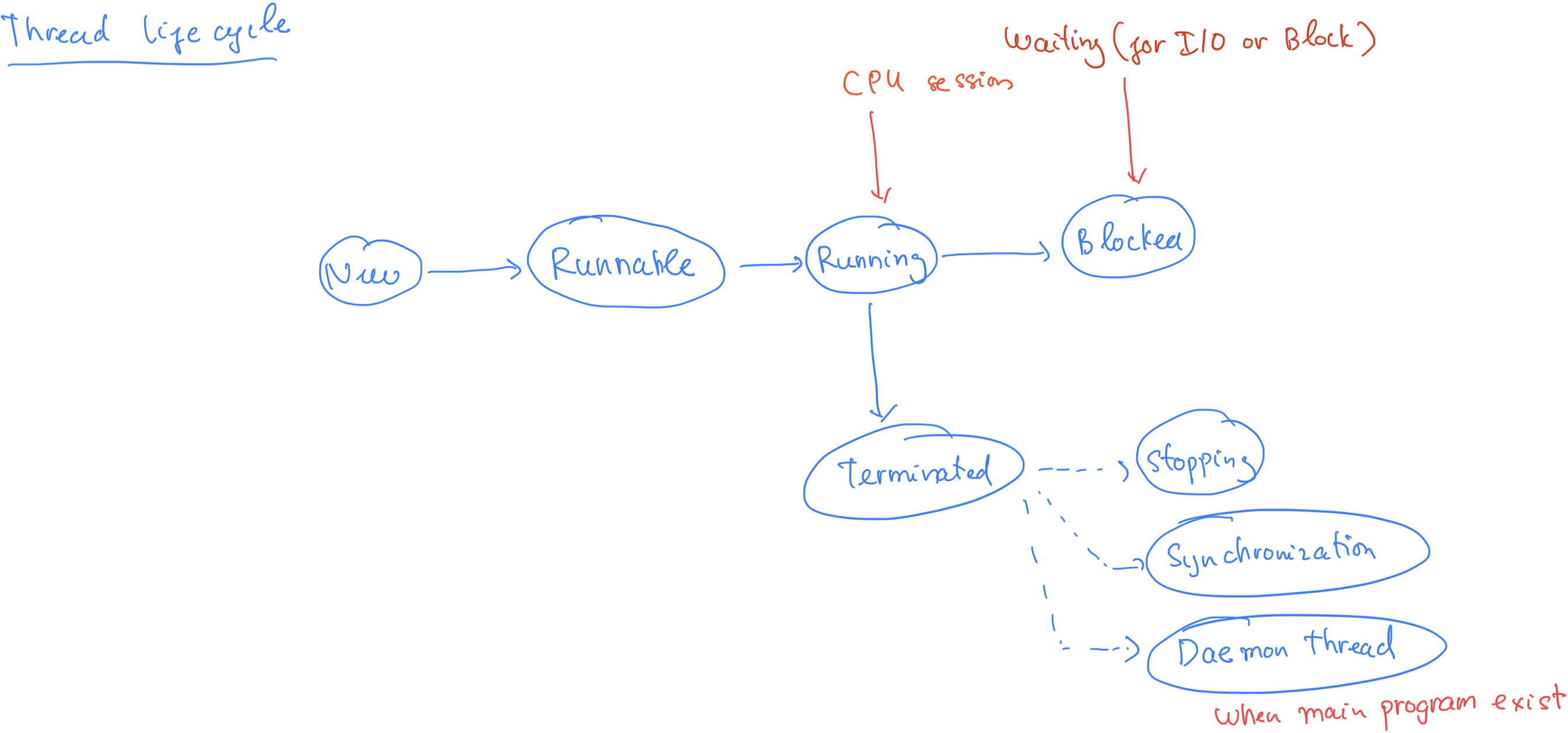
Python Thread Lifecycle States
-
New (Created): A thread is in this state once the threading.Thread object is created but before its
start()method is called. It is just an object and is not yet executing any code. -
Runnable (Ready/Alive): After
thread.start()is called, the thread is considered "alive" and moves to the runnable state. In this state, it is managed by the operating system's thread scheduler and is waiting for CPU time to run. -
Running: The thread is actively executing its tasks defined in the run() method. Due to the GIL in the standard CPython interpreter, only one Python thread can truly be in the running state at any given time, limiting true parallel execution of CPU-bound tasks.
-
Blocked/Waiting/Sleeping: The thread may temporarily pause or stop running for several reasons:
- I/O or Synchronization: The thread is waiting for an input/output operation to complete (like reading a file or network request) or waiting to acquire a lock/semaphore for synchronization.
- Sleeping: The thread has been explicitly put to sleep for a specified duration using methods like time.sleep().
- Joining: A thread can enter a waiting state if the main program or another thread calls its join() method, blocking the caller until the joined thread terminates.
- Terminated (Dead): The thread reaches this final state when its run() method completes, either normally or due to an unhandled exception. A terminated thread cannot be restarted
CPython's internal threading mechanism
-
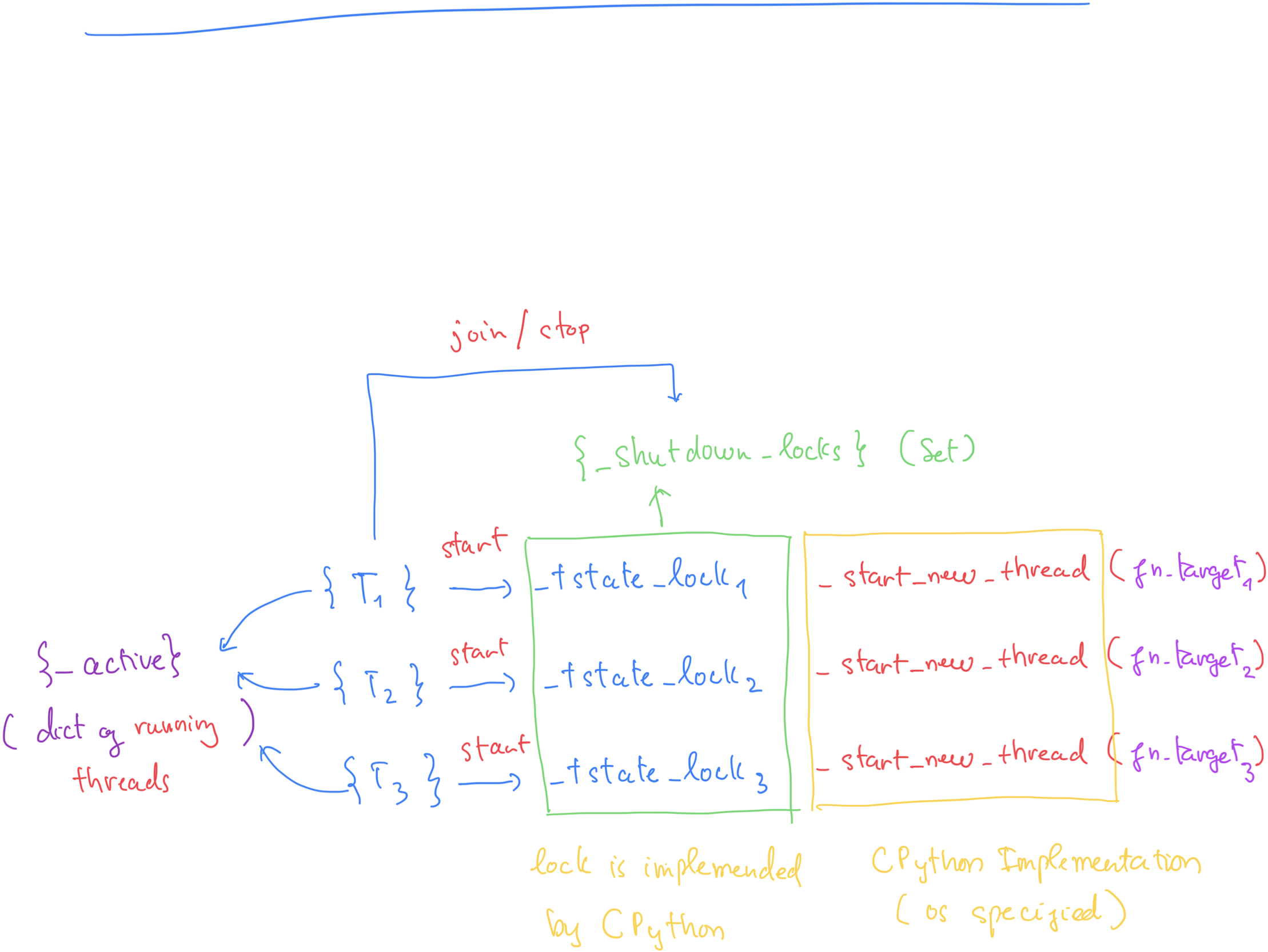
Threads: These represent separate flows of execution created using mechanisms like
start_new_threadwhich is refer to new thread method implement in C -
T-state locks: These appear to be internal thread state locks. In CPython, each OS thread has an associated "thread state struct" that stores Python-related information, and access to this state needs synchronization.
-
CPython Implementation: The diagram points out that the lock mechanism is implemented by CPython (or is OS-specified): the GIL is an internal CPython mechanism that restricts simultaneous execution of Python bytecode.
threading.local
import threading

# data = threading.local()

from _threading_local import local
data = local()


def worker():
    data.x = threading.current_thread().name

    print(data.x)

threads = [threading.Thread(target=worker) for _ in range(3)]
for t in threads:
    t.start()
Hey, key: <weakref at 0x10573c090; to '_localimpl' at 0x1056a6f80>
Hey, key: <weakref at 0x10573d760; to '_localimpl' at 0x1056a6f80>
Thread-4 (worker)
Hey, key: <weakref at 0x10573d530; to '_localimpl' at 0x1056a6f80>
Thread-5 (worker)
Hey, key: <weakref at 0x10573d8f0; to '_localimpl' at 0x1056a6f80>
Thread-6 (worker)