Appendix-02.Threads_and_Processes
Threads vs Processes
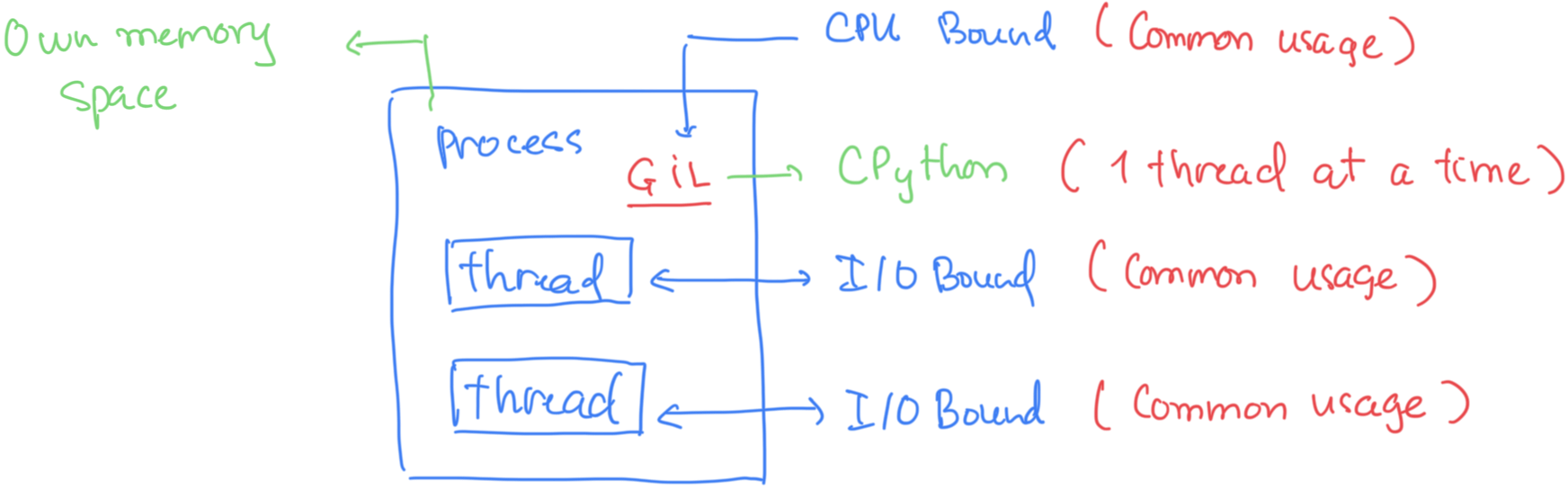
Process has "Own memory Space": A process is an independent execution environment managed by the operating system, which includes its own distinct memory space. This is correctly shown at the top left of the diagram.
CPython uses one thread at a time (due to GIL): The core function of the Global Interpreter Lock (GIL): it acts as a mutex (lock) that ensures only one thread can execute Python bytecode at any given moment, even on multi-core processors.
Threads are I/O Bound (Common usage): The diagram correctly shows that threads are typically used for I/O-bound tasks in Python. When an I/O operation occurs (e.g., waiting for a network response or file read), the thread releases the GIL, allowing other threads to acquire it and run, thus achieving concurrency for these types of tasks.
CPU Bound tasks struggle with the GIL: The diagram implies that CPU-bound tasks are constrained by the GIL, as only one thread can actively compute at a time. Trying to use multiple threads for purely CPU-bound tasks in CPython will not achieve true parallelism and can even add overhead from constant context switching.
Threads (only one GIL shared)
import threading, time

from tasks import cpu_task

t1 = threading.Thread(target=cpu_task)
t2 = threading.Thread(target=cpu_task)

start = time.time()
t1.start(); t2.start()
t1.join(); t2.join()
print("Total time:", time.time() - start)
Process finished inProcess finished in 2.0034258365631104 2.012209892272949 Total time: 2.0227320194244385
Expected result:
-
Each task takes ~1–1.5 seconds
-
Total time ≈ sum of both, e.g. ~2–3 seconds
→ No parallel CPU execution → because one GIL
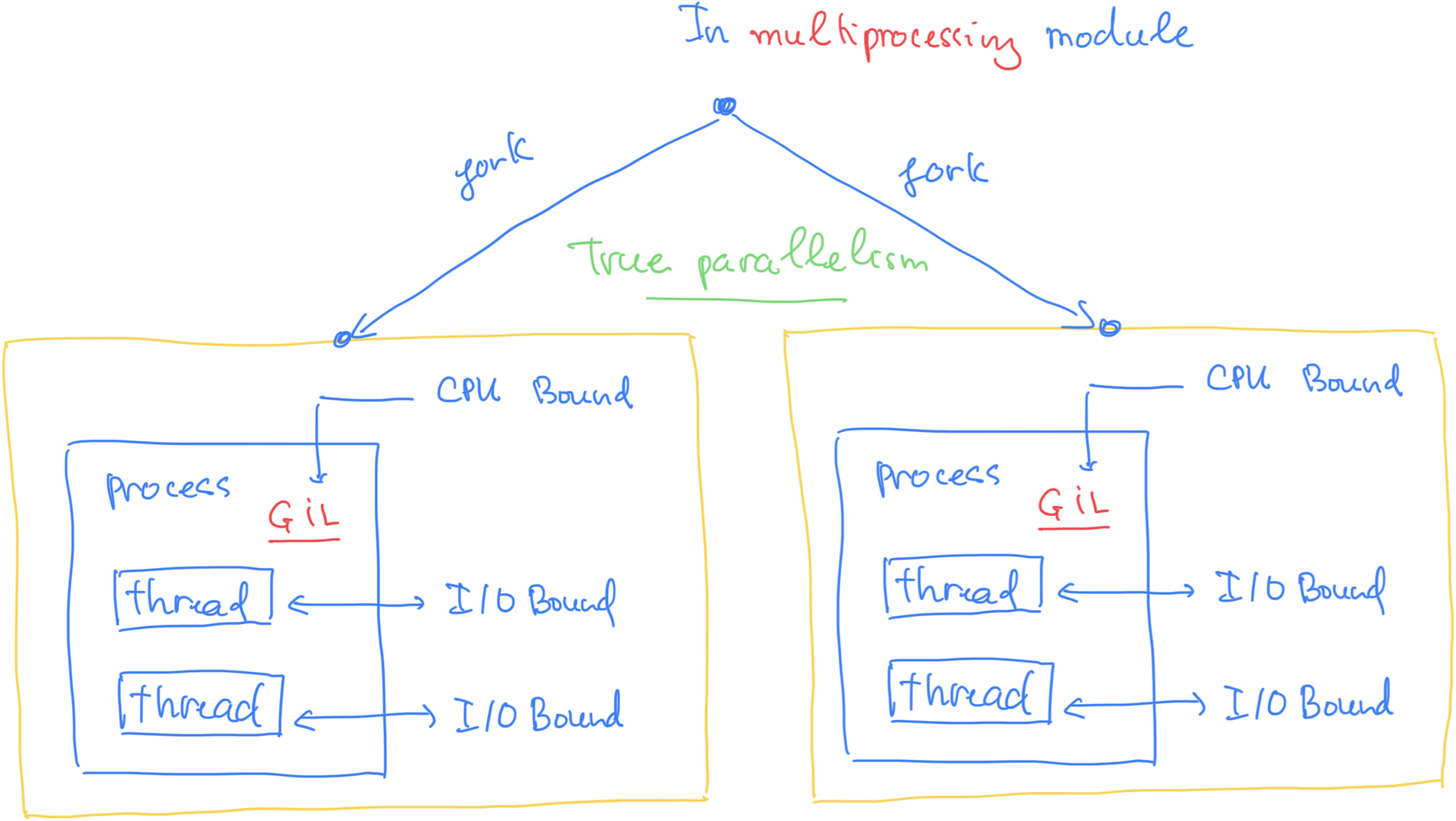
Multiprocessing (each process has its own GIL)
from multiprocessing import Process
import time

from tasks import cpu_task


p1 = Process(target=cpu_task)
p2 = Process(target=cpu_task)

start = time.time()
p1.start(); p2.start()
p1.join(); p2.join()
print("Total time:", time.time() - start)
Process finished in 1.1095759868621826 Process finished in 1.1105716228485107 Total time: 1.2385430335998535
A more direct explanation
from multiprocessing import Process
p = Process(target=cpu_task)
p.start()
The OS does this:
-
fork/spawn → create a new OS-level process
-
New process loads a new CPython interpreter
-
That interpreter initializes its own GIL
-
That process runs your function independently on another CPU core
So by design:
-
1 process → 1 interpreter → 1 GIL
-
4 processes → 4 interpreters → 4 GILs
This is why multiprocessing can use multiple CPU cores.
Threads (threading module)
- A thread is a lightweight unit of execution inside a process.
- Multiple threads share the same memory space of the process.
- Threads are cheap to create, but:
- In CPython, the Global Interpreter Lock (GIL) means only one thread executes Python bytecode at a time.
- Threads are mostly useful for I/O-bound tasks (networking, reading files, waiting), not CPU-bound computation.
Example:
import threading

def worker():
    print("Thread is running")

t = threading.Thread(target=worker)
t.start()
t.join()
Multiple threads can read/write shared data, but you must be careful with locks to prevent race conditions.
Processes (os.fork() or multiprocessing)
- A process is an independent program execution with its own memory space.
- Processes do not share memory (unless you use special shared memory or queues).
- Processes are heavier than threads but:
- They bypass the GIL, so multiple processes can run Python code in parallel on multiple CPU cores.
- Useful for CPU-bound tasks.
Example using multiprocessing:
from multiprocessing import Process

def worker():
    print("Process is running")

p = Process(target=worker)
p.start()
p.join()
Each process is fully independent. Changes in one process’s memory don’t affect the other.
3. Key Differences Table
| Feature | Thread (threading) | Process (os.fork / multiprocessing) |
|---|---|---|
| Memory | Shared | Separate |
| Creation overhead | Low | High |
| Parallelism in Python | Limited by GIL (CPU-bound) | True parallelism possible |
| Crash isolation | If one thread crashes, all threads may crash | Independent; crash doesn’t affect others |
| Use case | I/O-bound tasks | CPU-bound tasks |
4. Important Note About os.fork()
os.fork()is low-level, duplicates the current process exactly as is.- It’s dangerous in multi-threaded programs (like Jupyter) because it copies threads and resources, leading to potential deadlocks.
multiprocessingis safer because it handles process creation and communication for you.
So multiprocessing can achieve true parallelism
- By creating separate processes, while threading cannot bypass the GIL for CPU-bound tasks.