Authentication
This document covers authentication concepts including JSON Web Tokens (JWT), OAuth2 Password Flow, password hashing, and Google OAuth2 integration.
📚 Table of Contents
- Part 1: Overview
- Part 2: JSON Web Tokens (JWT)
- Part 3: Password Hashing
- Part 4: OAuth2 Password Flow
- Part 5: OAuth2 with Google
- Part 6: Building an Auth Server
- Appendix: Greenlet for Async Integration
Part 1: Overview
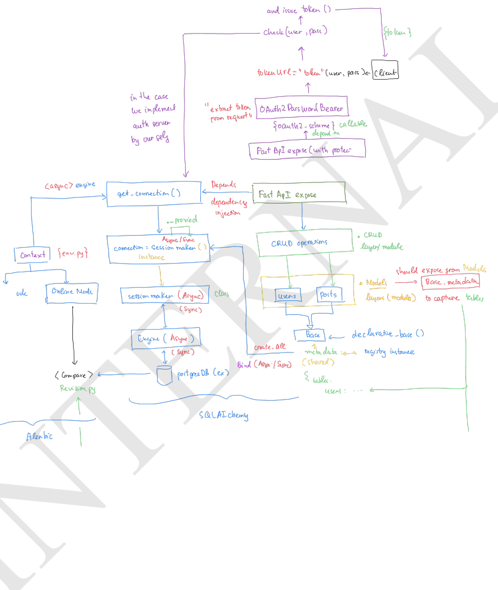
Key Topics
- OAuth2 Password Flow: Token-based authentication
- JSON Web Tokens (JWT): Stateless token format
- Password Hashing: Secure password storage with bcrypt
- OAuth2PasswordBearer: FastAPI's security dependency
- get_current_user: Dependency pattern for user extraction
Part 2: JSON Web Tokens (JWT)
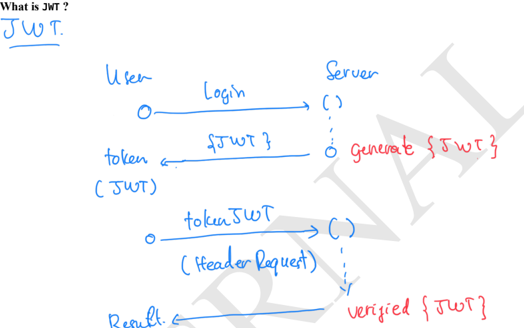
What is JWT?
JWT (JSON Web Token) is an open standard (RFC 7519) for securely transmitting information between parties as a JSON object.
JWT Structure
A JWT consists of three parts separated by dots:
header.payload.signature
- Header: Token type and signing algorithm
- Payload: Claims (data) like user ID, roles, expiration
- Signature: Ensures token hasn't been tampered with
Advantages
- Stateless: No need to store session on server
- Compact: Easy to transmit via URL, header, or body
- Secure: Signed and optionally encrypted
Common Use Cases
- API authentication
- Single Sign-On (SSO)
- Mobile and SPA authentication
JWT with HS256 (Shared Secret)
Installation:
pip install PyJWT
Creating a JWT:
import jwt
from datetime import datetime, timedelta, timezone

ALGORITHM = "HS256"
SECRET_KEY = "super-strong-secret-change-me"

def create_jwt(user_id: str) -> str:
    now = datetime.now(timezone.utc)
    payload = {
        "user_id": user_id,
        "iat": int(now.timestamp()),
        "exp": int((now + timedelta(minutes=15)).timestamp()),
        "iss": "your-app",
        "aud": "your-client",
        "roles": ["user"]
    }
    token = jwt.encode(payload, SECRET_KEY, algorithm=ALGORITHM)
    return token

token = create_jwt("haitth")
print("JWT (HS256):", token)
Verifying a JWT:
import jwt

def verify_jwt(token: str) -> dict:
    try:
        decoded = jwt.decode(
            token,
            SECRET_KEY,
            algorithms=["HS256"],
            audience="your-client",
            issuer="your-app",
        )
        return decoded
    except jwt.ExpiredSignatureError:
        raise ValueError("Token has expired.")
    except jwt.InvalidAudienceError:
        raise ValueError("Invalid audience.")
    except jwt.InvalidIssuerError:
        raise ValueError("Invalid issuer.")
    except jwt.InvalidTokenError as e:
        raise ValueError(f"Invalid token: {e}")

claims = verify_jwt(token)
print("Verified claims:", claims)
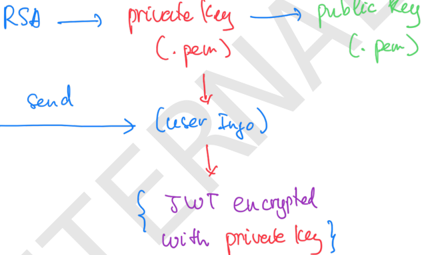
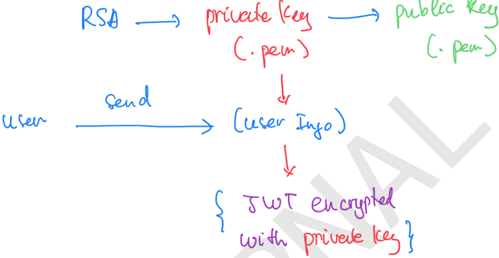
JWT with RS256 (Public/Private Key)
Installation:
pip install "pyjwt[crypto]"
Generate Key Pair:
# Private key
openssl genrsa -out private.pem 2048

# Public key
openssl rsa -in private.pem -pubout -out public.pem
Encode with Private Key:
import jwt
from datetime import datetime, timedelta, timezone

def read_file(path: str) -> str:
    with open(path, "r", encoding="utf-8") as f:
        return f.read()

PRIVATE_KEY = read_file("private.pem")

def create_jwt_rs256(user_id: str) -> str:
    now = datetime.now(timezone.utc)
    payload = {
        "user_id": user_id,
        "iat": int(now.timestamp()),
        "exp": int((now + timedelta(minutes=15)).timestamp()),
        "iss": "your-app",
        "aud": "your-client",
        "scope": "read:profile",
    }
    token = jwt.encode(payload, PRIVATE_KEY, algorithm="RS256")
    return token

token = create_jwt_rs256("haitt")
print("JWT (RS256):", token)
Decode with Public Key:
PUBLIC_KEY = read_file("public.pem")

def verify_jwt_rs256(token: str) -> dict:
    try:
        decoded = jwt.decode(
            token,
            PUBLIC_KEY,
            algorithms=["RS256"],
            audience="your-client",
            issuer="your-app",
        )
        return decoded
    except jwt.ExpiredSignatureError:
        raise ValueError("Token has expired.")
    except jwt.InvalidTokenError as e:
        raise ValueError(f"Invalid token: {e}")

claims = verify_jwt_rs256(token)
print("Verified claims:", claims)
Part 3: Password Hashing
Always hash passwords before storage. Use bcrypt with sufficient rounds for security.
Installation:
pip install passlib[bcrypt]
Password Hashing Functions:
from passlib.context import CryptContext

pwd_context = CryptContext(schemes=["bcrypt"], deprecated="auto")

def hash_password(password: str) -> str:
    """Hash a password for storage."""
    return pwd_context.hash(password)

def verify_password(plain_password: str, hashed_password: str) -> bool:
    """Verify a password against its hash."""
    return pwd_context.verify(plain_password, hashed_password)

# Example usage
hashed = hash_password("mysecretpassword")
print(f"Hashed: {hashed}")

is_valid = verify_password("mysecretpassword", hashed)
print(f"Password valid: {is_valid}")
Part 4: OAuth2 Password Flow
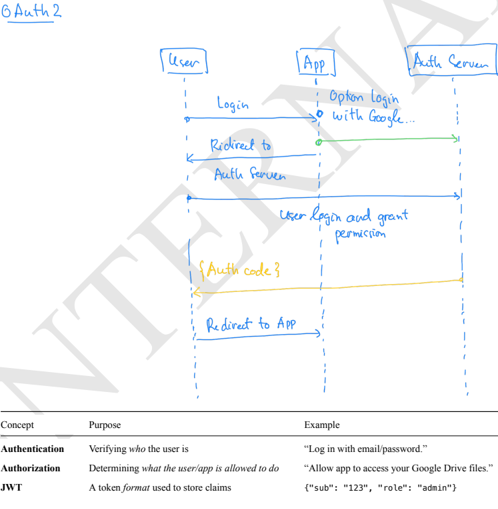
What is OAuth2?
OAuth 2.0 is a framework for granting limited access to resources without sharing credentials. It defines:
| Concept | Purpose | Example |
|---|---|---|
| OAuth2 | A framework for authorization | Google login, GitHub OAuth |
Main Roles
- Resource Owner: The user who owns the data
- Client: The application requesting access
- Authorization Server: Issues tokens after verifying the user
- Resource Server: Hosts the protected resources (APIs)
Core Flow
- Authorization Request: Client asks user for permission
- Authorization Grant: User approves, client gets a grant
- Access Token Exchange: Client exchanges grant for token
- API Access: Client uses token to call resource server
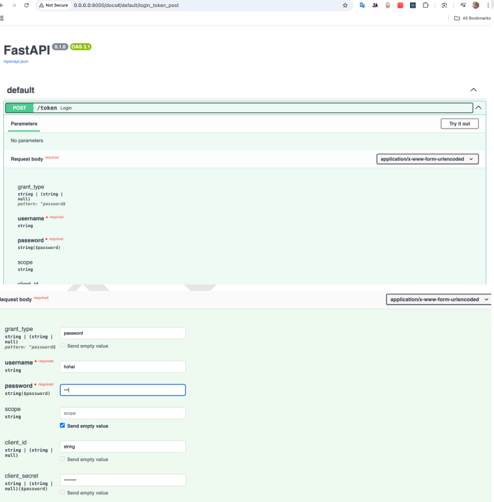
OAuth2PasswordRequestForm
This is FastAPI's dependency class for parsing login forms:
Fields:
username(required)password(required)scope(optional)grant_type(optional)client_id(optional)client_secret(optional)
Usage:
from fastapi import FastAPI, Depends
from fastapi.security import OAuth2PasswordRequestForm

app = FastAPI()

@app.post("/token")
async def login(form_data: OAuth2PasswordRequestForm = Depends()):
    # Access form_data.username and form_data.password
    user_dict = {"username": form_data.username}
    # verify username & password here...
    return {"access_token": user_dict["username"], "token_type": "bearer"}
Expected Request Format:
POST /token
Content-Type: application/x-www-form-urlencoded

grant_type=password&username=johndoe&password=secret
The client must send data as application/x-www-form-urlencoded, not JSON.
OAuth2PasswordBearer
Extract tokens from the Authorization header:
from fastapi.security import OAuth2PasswordBearer
from jose import JWTError, jwt
from fastapi import Depends, HTTPException, status

oauth2_scheme = OAuth2PasswordBearer(tokenUrl="token")

async def get_current_user(token: str = Depends(oauth2_scheme)):
    credentials_exception = HTTPException(
        status_code=status.HTTP_401_UNAUTHORIZED,
        detail="Could not validate credentials",
        headers={"WWW-Authenticate": "Bearer"},
    )
    try:
        payload = jwt.decode(token, SECRET_KEY, algorithms=[ALGORITHM])
        username: str = payload.get("sub")
        if username is None:
            raise credentials_exception
        return username
    except JWTError:
        raise credentials_exception
Part 5: OAuth2 with Google
Step 1: Create Google OAuth Client

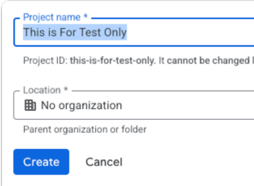
- Go to Google Cloud Console
- Click Create Credentials → OAuth client ID
- Choose Desktop App
- Download the JSON file (
client_secret.json)
Step 2: Minimal Working Code
Installation:
pip install google-auth-oauthlib
Code:
from google_auth_oauthlib.flow import InstalledAppFlow

# Scopes for email and profile
SCOPES = [
    "openid",
    "https://www.googleapis.com/auth/userinfo.profile",
    "https://www.googleapis.com/auth/userinfo.email",
]

# Path to OAuth client JSON
CLIENT_SECRET_FILE = "client_secret.json"

# Create flow instance
flow = InstalledAppFlow.from_client_secrets_file(CLIENT_SECRET_FILE, SCOPES)

# Run local server - opens Google login page
credentials = flow.run_local_server(port=8080)

# Show token info
print("Access Token:", credentials.token)
print("ID Token:", credentials.id_token)
print("Refresh Token:", credentials.refresh_token)
print("User logged in successfully!")
Step 3: Extract User Info
from google.oauth2 import id_token
from google.auth.transport import requests

request = requests.Request()

user_info = id_token.verify_oauth2_token(
    credentials.id_token,
    request,
    audience=flow.client_config['client_id']
)

print(user_info)
# Output: {'email': 'user@gmail.com', 'name': 'John Doe', ...}
Part 6: Building an Auth Server
Base AuthServer Class
from datetime import datetime, timedelta
from jose import jwt

class AuthServer:
    def __init__(self):
        self._access_token_expire_mins = 30
        self._secret_key = "supersecretkey123"
        self._algorithm = "HS256"

    def authen_user(self, *args, **kwargs) -> dict:
        raise NotImplementedError()

    def issue_token(self, *args, **kwargs):
        user_dict = self.authen_user(*args, **kwargs)
        if user_dict is None:
            raise Exception("User not authenticated")

        to_encode = user_dict.copy()
        expire = datetime.now() + timedelta(minutes=self._access_token_expire_mins)
        to_encode.update({"exp": expire})
        return jwt.encode(to_encode, self._secret_key, algorithm=self._algorithm)

    def verify_token(self, token: str) -> dict:
        return jwt.decode(token, self._secret_key, algorithms=[self._algorithm])
FastAPI Integration
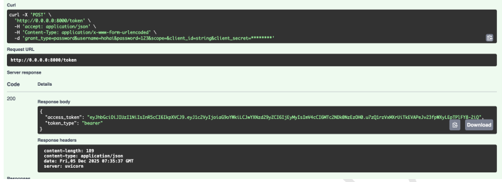
from fastapi import FastAPI, Depends
from fastapi.security import OAuth2PasswordRequestForm

app = FastAPI()

# Build auth_server with your user verification function
auth_server = AuthUserPassServer(
    fn_check_userpass=lambda u, p: {"user": u, "password": p}
)

@app.post("/token")
async def login(form_data: OAuth2PasswordRequestForm = Depends()):
    token = auth_server.issue_token(form_data.username, form_data.password)
    return {"access_token": token, "token_type": "bearer"}

@app.post("/me")
async def verify(token: str):
    return auth_server.verify_token(token)
Appendix: Greenlet for Async Integration
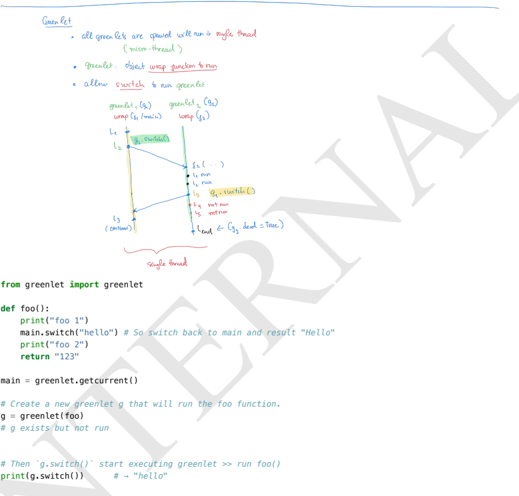
Greenlets allow you to break up blocking code into chunks, pause execution, and resume later - useful for integrating sync code with async frameworks.
Key Concepts
| Aspect | Greenlet Behavior |
|---|---|
| Memory | Shared (same thread) |
| Mutable objects | Shared between greenlets |
| Local variables | Private to each greenlet |
| Thread safety/locks | Not needed (single thread) |
| Race conditions | Only logical/ordering issues |
Why Greenlets Matter for SQLAlchemy
Async methods like await session.execute() don't directly call async database drivers. Instead, they:
- Create a greenlet
- Run synchronous engine inside it
- "Suspend" and "resume" using greenlet switches
- Return an awaitable back to asyncio
📖 References
| Resource | Link | Duration |
|---|---|---|
| FastAPI OAuth2 Tutorial | fastapi.tiangolo.com | ~25 min |
| PyJWT Documentation | pyjwt.readthedocs.io | ~20 min |
| Passlib BCrypt | passlib.readthedocs.io | ~20 min |
| RFC 6749 (OAuth 2.0) | rfc-editor.org | ~20 min |
Learning Checklist
- Describe OAuth2 Password flow and when it's appropriate
- Implement
/tokenendpoint usingOAuth2PasswordRequestForm - Create
verify_password()andget_password_hash()with Passlib - Implement
create_access_token()using PyJWT withsubandexpclaims - Secure endpoints with Bearer JWT and
get_current_userdependency - Validate token expiration and handle invalid/expired tokens
- Document password hashing parameters (bcrypt rounds)
- Test end-to-end: register → login → protected route → reject after expiry
This document covers:
- JWT: Token structure, HS256/RS256 algorithms, creation and verification
- Password Hashing: Secure storage with bcrypt
- OAuth2 Password Flow: Form-based authentication in FastAPI
- Google OAuth2: Integration with Google's OAuth2 system
- Auth Server: Building reusable authentication components