Database Setup
This document covers setting up PostgreSQL with Docker, connecting using Python (asyncpg), implementing SQLAlchemy ORM, integrating with FastAPI, and managing schema migrations with Alembic.
📚 Table of Contents
- Part 1: Database Setup on Docker
- Part 2: Connect to PostgreSQL Using Python
- Part 3: SQLAlchemy ORM
- Part 4: Integrate with FastAPI
- Part 5: Dependency Injection
- Part 6: Async SQLAlchemy with FastAPI
- Part 7: Alembic Migrations
- Appendix: Troubleshooting
Part 1: Database Setup on Docker
Install Docker
From 2025, Docker Desktop is not allowed for company use due to licensing. Use Docker CE (Community Edition) instead:
- Windows: Install Docker CE in WSL (Windows Subsystem for Linux)
- macOS: Use Colima or Docker Desktop for personal use only
Docker Compose Setup
Create a docker-compose.yml file:
version: '3.9'

services:
  postgres:
    image: 'postgres'
    ports:
      - '5432:5432'
    environment:
      POSTGRES_PASSWORD: postgres
      POSTGRES_USER: root
      POSTGRES_DB: example_pgdb

  adminer:
    image: dockette/adminer
    ports:
      - 8080:80

  pgadmin:
    image: dpage/pgadmin4
    ports:
      - 5050:80
    environment:
      PGADMIN_DEFAULT_EMAIL: 'admin@example.com'
      PGADMIN_DEFAULT_PASSWORD: 'abc@123'
Start the Services
docker compose up -d
Verify Setup
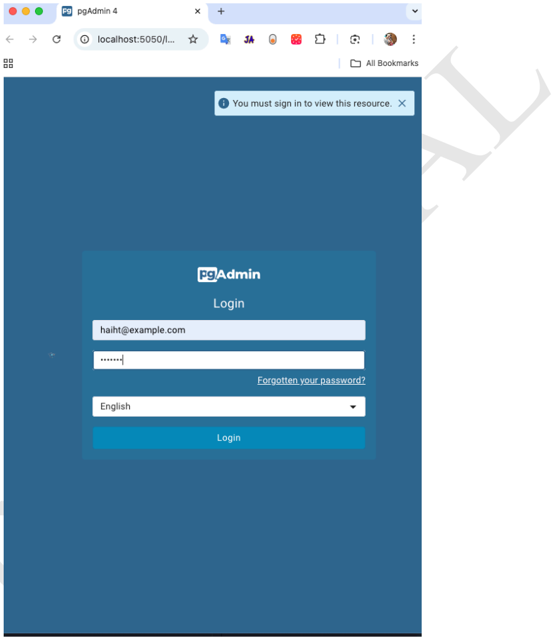
Access pgAdmin at http://localhost:5050 and login with the configured credentials.
Part 2: Connect to PostgreSQL Using Python
Install Required Packages
pip install asyncpg
Create Connection
import asyncio
import asyncpg

connection_info = {
    "user": "root",
    "password": "postgres",
    "database": "example_pgdb",
    "host": "localhost",
    "port": 5432,
}

async def make_connection():
    return await asyncpg.connect(**connection_info)

async def test_connection():
    conn = await make_connection()
    try:
        value = await conn.fetchval("SELECT 1;")
        print("Connection OK, result:", value)
    finally:
        await conn.close()

asyncio.run(test_connection())
Initialize Database
async def make_db():
    create_schema_command = """
    CREATE TABLE IF NOT EXISTS demo_test_users (
        id SERIAL PRIMARY KEY,
        name TEXT NOT NULL,
        created_at TIMESTAMPTZ DEFAULT NOW()
    )
    """

    conn = await make_connection()

    # Create schema
    await conn.execute(create_schema_command)

    # Insert demo records
    await conn.executemany(
        "INSERT INTO demo_test_users (name) VALUES ($1)",
        [("Alice",), ("Bob",), ("Charlie",)],
    )

    await conn.close()

asyncio.run(make_db())
Transaction Safety
Wrap operations in a transaction for data consistency:
async def make_db_safe(conn):
    async with conn.transaction():
        await conn.execute("""
            CREATE TABLE IF NOT EXISTS demo_test_users (
                id SERIAL PRIMARY KEY,
                name TEXT NOT NULL
            );
        """)
        await conn.executemany(
            "INSERT INTO demo_test_users (name) VALUES ($1)",
            [("Alice",), ("Bob",)]
        )
Query Data
from contextlib import asynccontextmanager

@asynccontextmanager
async def get_connection_safe():
    conn = await make_connection()
    try:
        yield conn
    finally:
        await conn.close()

async def query_data():
    async with get_connection_safe() as conn:
        rows = await conn.fetch("SELECT * FROM demo_test_users;")
        return [dict(row) for row in rows]

result = asyncio.run(query_data())
print(result)
Part 3: SQLAlchemy ORM
What is SQLAlchemy?
SQLAlchemy is a Python library for working with databases. It provides two main layers:
| Layer | Description | Use Case |
|---|---|---|
| Core | Low-level SQL expression language | When you want explicit SQL control |
| ORM | High-level object-relational mapping | When you want Python objects instead of SQL strings |
Install Dependencies
pip install sqlalchemy asyncpg
Core Layer Example
from sqlalchemy import Table, Column, Integer, String, MetaData, select

metadata = MetaData()

users = Table(
    "users",
    metadata,
    Column("id", Integer, primary_key=True),
    Column("name", String),
)

stmt = select(users).where(users.c.name == "Alice")
ORM Layer Example
from sqlalchemy.orm import DeclarativeBase, Mapped, mapped_column

class Base(DeclarativeBase):
    pass

class User(Base):
    __tablename__ = "users"

    id: Mapped[int] = mapped_column(primary_key=True)
    name: Mapped[str]
SQLAlchemy vs Alternatives
| Tool | Description |
|---|---|
| SQLAlchemy | Full-featured, flexible, industry standard |
| Django ORM | Simpler but tightly coupled to Django |
| Peewee | Lightweight, simpler ORM |
| asyncpg | Fast, raw async PostgreSQL driver (no ORM) |
Async SQLAlchemy Setup
from datetime import datetime
from sqlalchemy import String, func, select
from sqlalchemy.orm import DeclarativeBase, Mapped, mapped_column
from sqlalchemy.ext.asyncio import create_async_engine, async_sessionmaker

DATABASE_URL = "postgresql+asyncpg://root:postgres@localhost:5432/example_pgdb"

class Base(DeclarativeBase):
    pass

class DemoTestUser(Base):
    __tablename__ = "demo_test_users"

    id: Mapped[int] = mapped_column(primary_key=True)
    name: Mapped[str] = mapped_column(String, nullable=False)
    created_at: Mapped[datetime] = mapped_column(server_default=func.now())

# Engine & session
engine = create_async_engine(DATABASE_URL, echo=True)

AsyncSessionLocal = async_sessionmaker(engine, expire_on_commit=False)
Query Data (ORM Style)
async def query_users():
    async with AsyncSessionLocal() as session:
        result = await session.execute(select(DemoTestUser))
        users = result.scalars().all()
        return users

for user in await query_users():
    print(user.id, user.name, user.created_at)
Part 4: Integrate with FastAPI
Full Example
from fastapi import FastAPI
from pydantic import BaseModel
from typing import List
from datetime import datetime
from contextlib import asynccontextmanager
from sqlalchemy import select
from sqlalchemy.ext.asyncio import create_async_engine, async_sessionmaker
from sqlalchemy.orm import DeclarativeBase, Mapped, mapped_column
from sqlalchemy import String, func

# Database setup
DATABASE_URL = "postgresql+asyncpg://root:postgres@localhost:5432/example_pgdb"

class Base(DeclarativeBase):
    pass

class DemoTestUser(Base):
    __tablename__ = "demo_test_users"
    id: Mapped[int] = mapped_column(primary_key=True)
    name: Mapped[str] = mapped_column(String, nullable=False)
    created_at: Mapped[datetime] = mapped_column(server_default=func.now())

engine = create_async_engine(DATABASE_URL, echo=True)
AsyncSessionLocal = async_sessionmaker(engine, expire_on_commit=False)

# Lifespan for startup/shutdown
@asynccontextmanager
async def lifespan(app: FastAPI):
    async with engine.begin() as conn:
        await conn.run_sync(Base.metadata.create_all)
    yield
    # Optional cleanup on shutdown

app = FastAPI(title="Demo SQLAlchemy Async API", lifespan=lifespan)

# Pydantic schema
class UserOut(BaseModel):
    id: int
    name: str
    created_at: datetime

    class Config:
        from_attributes = True

# Endpoints
@app.post("/users/init")
async def insert_demo_users():
    async with AsyncSessionLocal() as session:
        session.add_all([
            DemoTestUser(name="Alice"),
            DemoTestUser(name="Bob"),
            DemoTestUser(name="Charlie"),
        ])
        await session.commit()
    return {"status": "ok"}

@app.get("/users", response_model=List[UserOut])
async def get_users():
    async with AsyncSessionLocal() as session:
        result = await session.execute(select(DemoTestUser))
        users = result.scalars().all()
        return users
Part 5: Dependency Injection
Session Factory with Error Handling
from contextlib import asynccontextmanager

@asynccontextmanager
async def make_async_session_db():
    async with AsyncSessionLocal() as session:
        try:
            yield session
        except Exception as e:
            await session.rollback()
            raise RuntimeError(f"Database session error: {e!r}") from e
Using Dependency Injection in FastAPI
from fastapi import Depends
from typing import Annotated, AsyncGenerator
from sqlalchemy.ext.asyncio import AsyncSession

async def get_async_db_session() -> AsyncGenerator[AsyncSession, None]:
    """Yields a database session."""
    async with AsyncSessionLocal() as session:
        try:
            yield session
        except Exception as e:
            await session.rollback()
            raise RuntimeError(f"Database session error: {e!r}") from e

# Type alias for cleaner code
DB_Session = Annotated[AsyncSession, Depends(get_async_db_session)]

@app.get("/users/")
async def list_users(session: DB_Session):
    result = await session.execute(select(DemoTestUser))
    return result.scalars().all()
Part 6: Async SQLAlchemy with FastAPI
Complete CRUD Operations
Create (POST):
@app.post("/songs")
async def add_song(song_data: SongCreate, session: DB_Session):
    song = Song(name=song_data.name, artist=song_data.artist)
    session.add(song)
    await session.commit()
    await session.refresh(song)
    return song
Read (GET):
@app.get("/songs", response_model=list[Song])
async def get_songs(session: DB_Session):
    stmt = select(Song)
    result = await session.execute(stmt)
    songs = result.scalars().all()
    return songs
Update (PUT):
from fastapi import HTTPException

@app.put("/{todo_id}")
async def update_todo(db: DB_Session, todo_id: int, request_data: UpdateTodoRequest):
    stmt = select(Todo).where(Todo.id == todo_id, Todo.deleted_at.is_(None))
    todo = (await db.execute(stmt)).scalar()

    if todo is None:
        raise HTTPException(status_code=404, detail="Todo not found")

    todo.content = request_data.content
    await db.commit()
    await db.refresh(todo)
    return todo
Part 7: Alembic Migrations
What is Alembic?
Alembic is a database migration tool for SQLAlchemy. It manages incremental schema changes:
- Adding/removing columns
- Modifying data types
- Creating/dropping indices
- Version control for database schema
Why Use Alembic?
create_all()only creates tables if they don't exist- No way to alter existing tables
- Manual SQL DDL is error-prone
- Inconsistent environments across dev/staging/production
Analogy:
create_all()= Building a house from blueprints (works only if land is empty)- Alembic = Renovation permits (tracks every modification over time)
Install Alembic
pip install alembic
Initialize Alembic
# For async support
alembic init -t async migrations
Configure Alembic
Update alembic.ini or alembic/env.py:
# Inside alembic/env.py
from app.models.database import Base

target_metadata = Base.metadata
Generate Migration
# Set PYTHONPATH if needed
PYTHONPATH=. alembic revision --autogenerate -m "Initial schema"
Apply Migration
PYTHONPATH=. alembic upgrade head
Migration Script Example
def upgrade():
    op.add_column('user', sa.Column('address', sa.String(250)))

def downgrade():
    op.drop_column('user', 'address')
Online vs Offline Mode
| Feature | Online Mode | Offline Mode |
|---|---|---|
| Database connection | Yes | No |
| Executes SQL directly | Yes | No (outputs SQL text) |
| Can autogenerate | Yes | No |
| Use case | Apply migrations | Generate SQL for review |
| Command | alembic upgrade head | alembic upgrade head --sql > script.sql |
Appendix: Troubleshooting
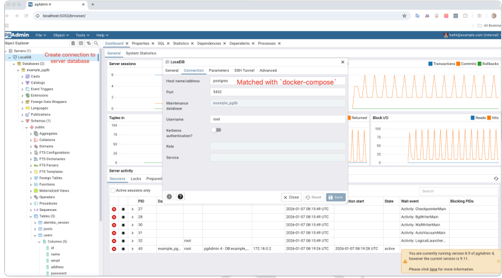
Connect to PostgreSQL from pgAdmin
When pgAdmin and PostgreSQL are in the same Docker Compose network:
- Host: Use the service name
postgres(notlocalhost) - Port:
5432 - Username/Password: From your docker-compose environment variables
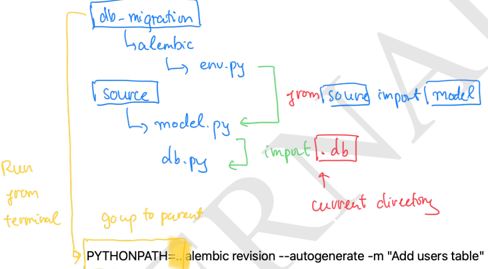
Relative Module Import Issues
When separating Alembic migrations to a separate project:
Setting PYTHONPATH for Debugging
Option 1: In launch.json
{
  "version": "0.2.0",
  "configurations": [
    {
      "name": "Python: Debug App",
      "type": "python",
      "request": "launch",
      "program": "${file}",
      "console": "integratedTerminal",
      "env": {
        "PYTHONPATH": "${workspaceFolder}/src"
      }
    }
  ]
}
Option 2: Using .env file
PYTHONPATH=src
Then reference in launch.json:
{
  "envFile": "${workspaceFolder}/.env"
}
Async Session Setup
from sqlalchemy.ext.asyncio import create_async_engine, AsyncSession, async_sessionmaker

AsyncSessionLocal = async_sessionmaker(
    engine,
    expire_on_commit=False,
    class_=AsyncSession
)

async def get_db_connection():
    async with AsyncSessionLocal() as db:
        yield db
📖 References
| Resource | Link | Duration |
|---|---|---|
| SQLAlchemy Intro | sqlalchemy.org | ~15 min |
| Async SQLAlchemy | docs.sqlalchemy.org | ~20 min |
| Alembic Tutorial | alembic.sqlalchemy.org | ~30 min |
| FastAPI + SQLAlchemy | dev.to | ~15 min |
Learning Checklist:
- Explain what SQLAlchemy ORM is and when to use it versus Core
- Define models using Declarative Base with SQLAlchemy 2.0 Mapped annotations
- Set up AsyncEngine and AsyncSession for non-blocking queries
- Show proper connection pooling and short-lived session usage patterns
- Initialize Alembic and generate autogenerated revisions
- Apply upgrade/downgrade migrations
- Integrate FastAPI + SQLAlchemy (async) with dependency-injected AsyncSession
- Demonstrate relationships (one-to-many/many-to-many)
- Document project structure (models, db session, migrations)
- Run end-to-end workflow: model change → revision → upgrade → test → rollback
This document covers the complete database setup workflow:
- Docker: Set up PostgreSQL with Docker Compose
- asyncpg: Connect to PostgreSQL asynchronously
- SQLAlchemy: Use ORM for cleaner Python code
- FastAPI: Integrate database with API endpoints
- Dependency Injection: Proper session management
- Alembic: Version-controlled schema migrations