Foundation and Inputs
This document synthesizes foundational knowledge about operating systems, asynchronous programming, and building APIs with FastAPI.
📚 Table of Contents
- Part 1: Understanding Operating Systems (OS Fundamentals)
- Part 2: Concurrency in Python
- Part 3: Web Concepts
- Part 4: FastAPI Introduction
Part 1: Understanding Operating Systems
1. File Descriptors
A File Descriptor (FD) is an integer that the operating system uses to identify I/O resources such as files, sockets, and pipes.
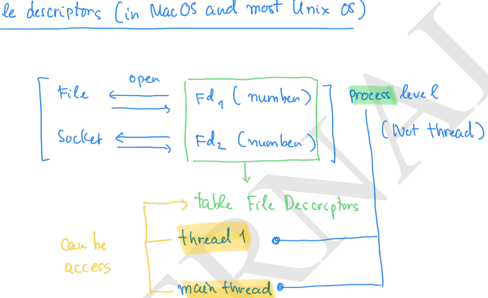
Characteristics of File Descriptors:
| Property | Description |
|---|---|
| Is an integer | A non-negative number (0, 1, 2, ...) |
| Local to process | Each process has its own FD table |
| Assigned by OS | OS automatically assigns when opening a resource |
| Not global | FD 5 in process A ≠ FD 5 in process B |
Standard File Descriptors:
# Standard FDs are reserved
FD 0 = stdin  (Standard Input)
FD 1 = stdout (Standard Output)
FD 2 = stderr (Standard Error)
FD 3+ = User-opened files, sockets, pipes...
Listing File Descriptors:
import os

# Method 1: Using /dev/fd (MacOS/Unix)
fds = os.listdir("/dev/fd")
print(fds)  # ['0', '1', '2', '3', ...]

# Method 2: Using os.fstat()
open_fds = []
for fd in range(0, 1024):
    try:
        os.fstat(fd)
        open_fds.append(fd)
    except OSError:
        pass
print(open_fds)
Common FD Types:
import stat

# Check file descriptor type
mode = os.fstat(fd).st_mode

stat.S_ISREG(mode)  # Regular file
stat.S_ISDIR(mode)  # Directory
stat.S_ISCHR(mode)  # Character device
stat.S_ISBLK(mode)  # Block device
stat.S_ISFIFO(mode) # Pipe
stat.S_ISSOCK(mode) # Socket
stat.S_ISLNK(mode)  # Symlink
FDs and Threads:
- FDs are managed at the Process level, not Thread level
- Threads within the same process share the FD table
- Use mutex/lock to avoid race conditions
2. Selectors and I/O Monitoring
Selectors is a module that helps monitor multiple file descriptors to check I/O status (ready to read/write) without blocking.
What Selectors Do:
| Event | Meaning |
|---|---|
EVENT_READ | FD is ready to read (non-blocking) |
EVENT_WRITE | FD is ready to write (non-blocking) |
What Selectors Do NOT Do:
- ❌ Read/write data
- ❌ Manage timeouts or threading
- ❌ Handle application logic
Example Using Selectors:
import selectors
import socket

# Create selector
sel = selectors.DefaultSelector()

# Create socket
sock = socket.socket(socket.AF_INET, socket.SOCK_STREAM)
sock.bind(('localhost', 12345))
sock.listen()

# Register socket to monitor EVENT_READ
sel.register(sock, selectors.EVENT_READ)

# Blocking call waiting for events
events = sel.select(timeout=1)
for key, mask in events:
    if key.fileobj == sock:
        connection, address = sock.accept()
        print(f"Accepted connection from {address}")
3. Socket Programming
What is a Socket?
A socket is an endpoint for network communication. When you create a socket, the OS allocates a file descriptor to manage it.
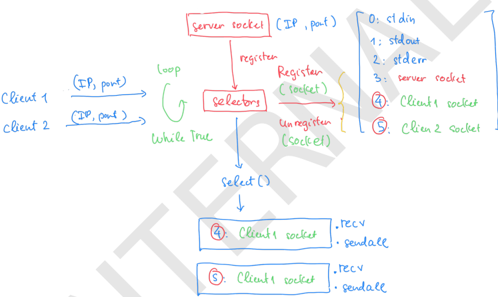
Server-Client Pattern with Selectors:
import selectors
import socket

sel = selectors.DefaultSelector()

# Create server socket
server_sock = socket.socket(socket.AF_INET, socket.SOCK_STREAM)
server_sock.bind(("0.0.0.0", 5555))
server_sock.listen()
server_sock.setblocking(False)

# Register server socket
sel.register(server_sock, selectors.EVENT_READ)

def accept_connection(sock):
    client_sock, addr = sock.accept()
    print(f"Accepted connection from {addr}")
    client_sock.setblocking(False)
    sel.register(client_sock, selectors.EVENT_READ)

def handle_client(sock):
    data = sock.recv(1024)
    if data:
        print("Received:", data.decode())
        sock.sendall(b"Message received\n")
    else:
        print("Client disconnected")
        sel.unregister(sock)
        sock.close()

# Event loop
while True:
    events = sel.select()
    for key, mask in events:
        sock = key.fileobj
        if sock is server_sock:
            accept_connection(sock)
        else:
            handle_client(sock)
Socket Pair:
import socket

# Create a pair of connected sockets
s1, s2 = socket.socketpair()

s1.send(b"Hello")
print(s2.recv(1024))  # b'Hello'

s2.send(b"World")
print(s1.recv(1024))  # b'World'
Socket pairs are commonly used to wake up the event loop when there are new tasks to process.
4. Event Loop
Event Loop Concept:
An Event Loop is an infinite loop that monitors events (I/O, timers, callbacks) and dispatches them to their corresponding handlers.
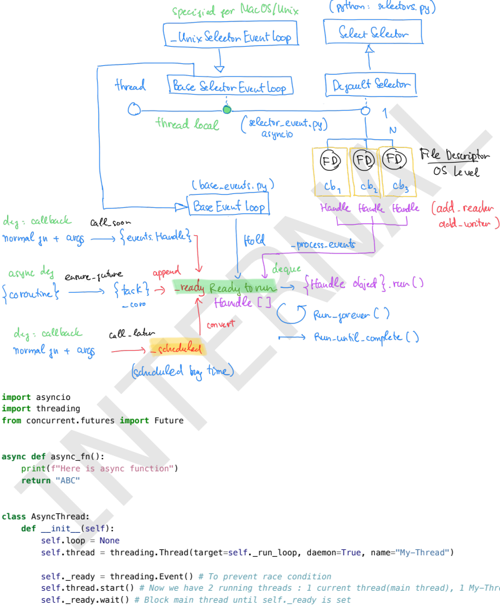
Characteristics of Event Loop in Python:
┌────────────────────┐
│    Main Thread     │
└────────────────────┘
         │
         ▼
    Event Loop A
   (running/idle)
         │
    ┌────┴────┐
    │  Tasks  │
    │ Queue   │
    └─────────┘
- Each event loop is attached to 1 thread
- Each thread has only 1 running loop at any given time
- You can create multiple loops but only 1 runs
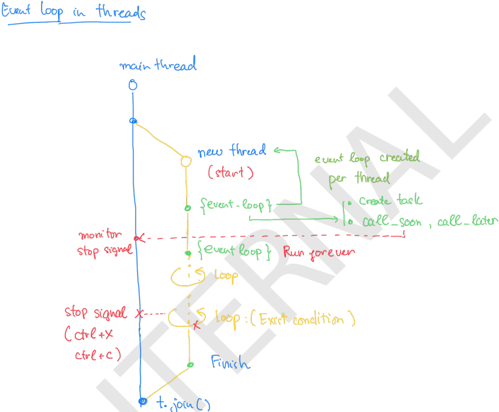
Creating an Event Loop:
import asyncio

# Get the current event loop (or create a new one)
loop = asyncio.get_event_loop()

# Or create a new loop
loop = asyncio.new_event_loop()
asyncio.set_event_loop(loop)

# Run a coroutine
async def async_fn():
    print("Hello from async")
    return "Done"

result = loop.run_until_complete(async_fn())
print(result)  # Done
AsyncThread Pattern:
Pattern for running an event loop in a separate thread:
import asyncio
import threading
from concurrent.futures import Future

class AsyncThread:
    def __init__(self):
        self.loop = None
        self.thread = threading.Thread(
            target=self._run_loop,
            daemon=True,
            name="AsyncThread"
        )
        self._ready = threading.Event()
        self.thread.start()
        self._ready.wait()  # Block until loop is ready

    def _run_loop(self):
        self.loop = asyncio.new_event_loop()
        asyncio.set_event_loop(self.loop)
        self._ready.set()
        self.loop.run_forever()

    def submit(self, coro) -> Future:
        return asyncio.run_coroutine_threadsafe(coro, self.loop)

    def shutdown(self):
        self.loop.call_soon_threadsafe(self.loop.stop)
        self.thread.join()
        self.loop.close()

# Usage
async def my_task():
    return "Hello from thread"

async_thread = AsyncThread()
future = async_thread.submit(my_task())
print(future.result())  # "Hello from thread"
Self-Implement Event Loop with Socket Pair:
import socket
import selectors
import threading

sel = selectors.DefaultSelector()

class MyEventLoop:
    def __init__(self):
        self.fns = []
        self._ssock, self._csock = socket.socketpair()
        self._ssock.setblocking(False)
        self._csock.setblocking(False)
        sel.register(self._ssock, selectors.EVENT_READ, self._wakeup_handler)

    def start(self):
        def run_forever():
            while True:
                events = sel.select(timeout=1)
                for key, mask in events:
                    callback = key.data
                    callback(key.fileobj, mask)
        t = threading.Thread(target=run_forever)
        t.start()

    def _wakeup_handler(self, sock, mask):
        sock.recv(1024)  # Drain wakeup byte
        for fn in self.fns:
            fn()

    def add_reader(self, fn):
        self.fns.append(fn)

    def wakeup(self):
        self._csock.send(b"\0")  # Wake up the loop
Part 2: Concurrency in Python
1. Threading in Python
GIL - Global Interpreter Lock:
The GIL is a mutex that ensures only 1 thread executes Python bytecode at a time, even on multi-core CPUs.
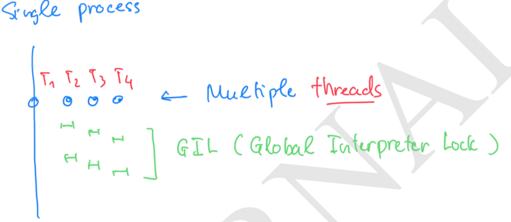
| Characteristic | Impact |
|---|---|
| I/O-bound tasks | Threads work well (GIL is released when waiting for I/O) |
| CPU-bound tasks | Threads are inefficient (no real parallelism) |
Thread Lifecycle:
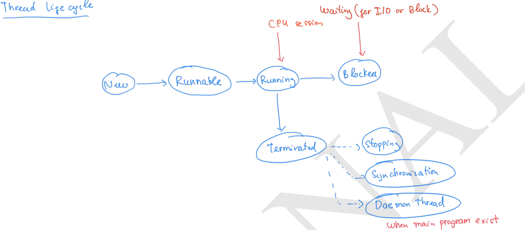
New (Created) → Runnable (Ready) → Running → Blocked/Waiting → Terminated
       ↑            ↓                           ↓
       └────────────┴───────────────────────────┘
States:
- New: Thread object is created,
start()not yet called - Runnable: After
start(), waiting for CPU time - Running: Currently executing
run() - Blocked/Waiting: Waiting for I/O, lock, sleep, join
- Terminated:
run()completed or exception occurred
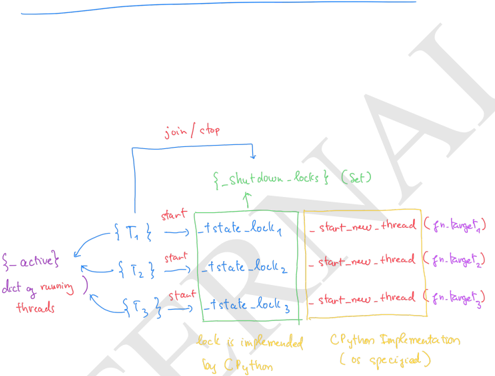
Threading Example:
import threading
import time

def worker(name):
    print(f"Thread {name} starting")
    time.sleep(1)
    print(f"Thread {name} finished")

# Create threads
t1 = threading.Thread(target=worker, args=("T1",))
t2 = threading.Thread(target=worker, args=("T2",))

# Start threads
t1.start()
t2.start()

# Wait for completion
t1.join()
t2.join()
print("All done!")
2. Processes and Multiprocessing
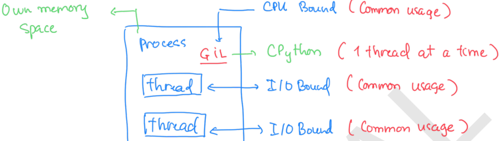
Comparing Thread vs Process:
| Feature | Thread | Process |
|---|---|---|
| Memory | Shared (same process) | Separate (independent) |
| Creation overhead | Low | High |
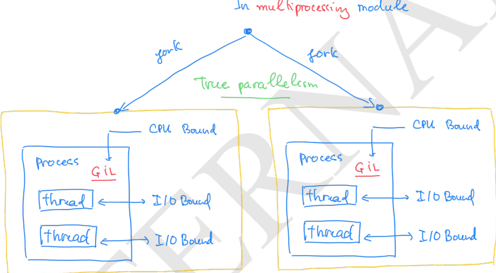
| Python parallelism | Limited (GIL) | True parallelism |
| Crash isolation | Crash affects all | Independent |
| Use case | I/O-bound tasks | CPU-bound tasks |
Multiprocessing Bypasses GIL:
from multiprocessing import Process
import time

def cpu_task():
    s = time.time()
    for _ in range(50_000_000):
        pass
    print(f"Process finished in {time.time() - s}")

# Create 2 processes
p1 = Process(target=cpu_task)
p2 = Process(target=cpu_task)

start = time.time()
p1.start(); p2.start()
p1.join(); p2.join()
print(f"Total time: {time.time() - start}")

# Output: ~1.3s (parallel)
# With threads: ~2s (sequential due to GIL)
- 1 process → 1 CPython interpreter → 1 GIL
- 4 processes → 4 interpreters → 4 GILs (parallel)
3. ThreadPool
ThreadPool helps manage and reuse threads efficiently:
from multiprocessing.pool import ThreadPool

def work(x):
    return x * x

# Create pool with 4 worker threads
pool = ThreadPool(processes=4)

# Map function to list
results = pool.map(work, [1, 2, 3, 4, 5])
print(results)  # [1, 4, 9, 16, 25]

# Cleanup
pool.close()
pool.join()
4. Fork in Unix
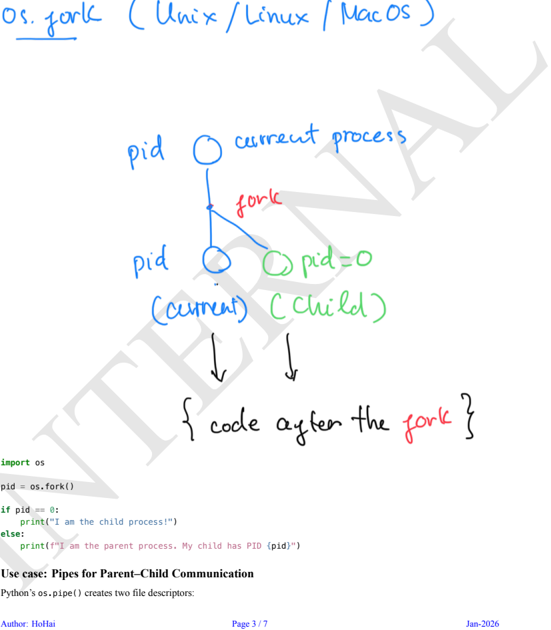
Basic os.fork():
import os

pid = os.fork()

if pid == 0:
    print("I am the CHILD process!")
else:
    print(f"I am the PARENT, child PID: {pid}")
Parent-Child Communication via Pipe:
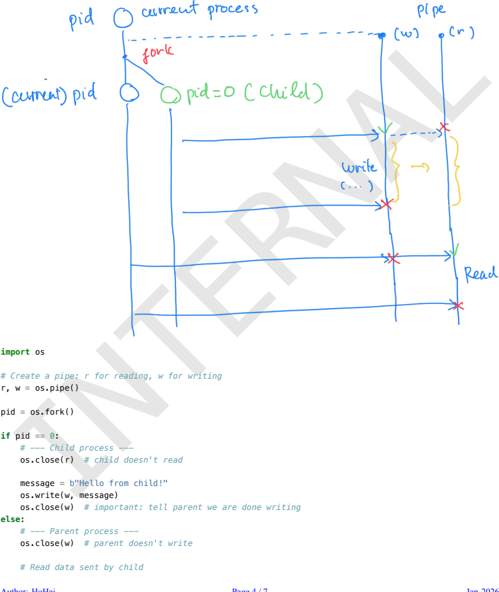
import os

# Create pipe: r for reading, w for writing
r, w = os.pipe()

pid = os.fork()

if pid == 0:
    # Child process
    os.close(r)  # Child doesn't read
    os.write(w, b"Hello from child!")
    os.close(w)
else:
    # Parent process
    os.close(w)  # Parent doesn't write
    data = os.read(r, 1024)
    print("Parent received:", data.decode())
    os.close(r)
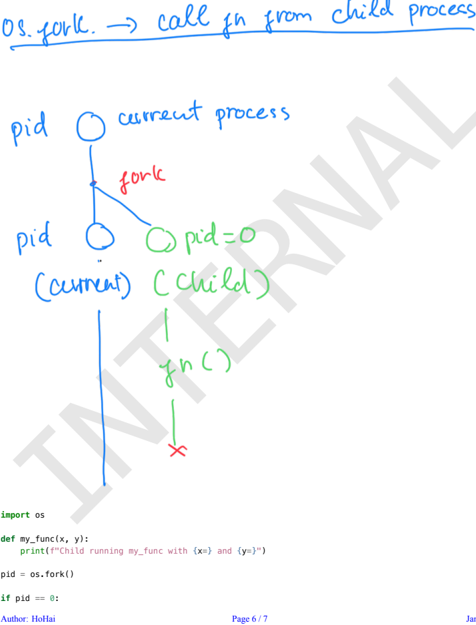
os.fork() is dangerous in multi-threaded programs because it copies threads and resources, which can cause deadlocks. Use the multiprocessing module instead.
5. CPython vs Pure Python
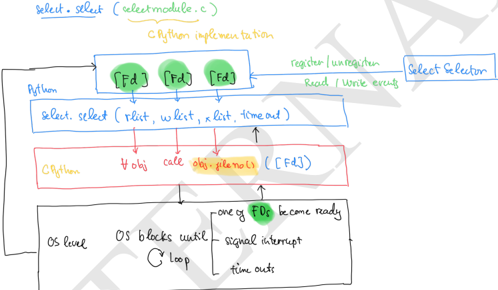
CPython often has 2 versions of the same module:
| Version | Characteristics |
|---|---|
| C implementation | Fast, optimized performance |
| Pure Python | Portable, readable, fallback |
Reasons:
- Performance: C version is much faster
- Portability: Python version runs everywhere
- Maintainability: Python version is the reference implementation
- Fallback: If C version fails, Python version substitutes
# Example: threading.local
# - C version: _thread._local (fast)
# - Python wrapper: threading.local (nice API)
6. Thread and Scope
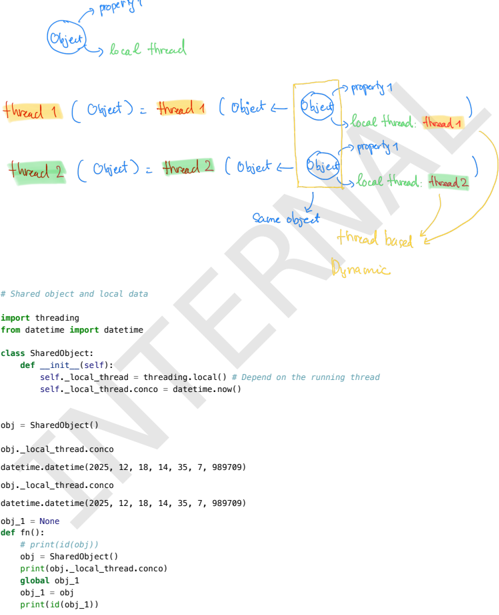
Threads Share Global Scope:
import threading
import time

count = 0  # Global variable

def try_count(name):
    global count
    count += 1
    time.sleep(0.1)
    print(f"Thread {name}: count = {count}")

t1 = threading.Thread(target=try_count, args=("T1",))
t2 = threading.Thread(target=try_count, args=("T2",))

t1.start(); t2.start()
t1.join(); t2.join()
# Output: Both threads may see count = 2 (race condition!)
Thread-Safe with Lock:
import threading

count = 0
lock = threading.Lock()

def try_count(name):
    global count
    with lock:  # Acquire lock
        count += 1
        print(f"Thread {name}: count = {count}")
    # Lock is automatically released
Thread Local Storage:
Each thread has its own data:
import threading

thread_local = threading.local()

def worker(name):
    thread_local.count = 0
    thread_local.count += 1
    print(f"Thread {name}: count = {thread_local.count}")

t1 = threading.Thread(target=worker, args=("T1",))
t2 = threading.Thread(target=worker, args=("T2",))

t1.start(); t2.start()
# Output: Each thread has its own count = 1
Part 3: Web Concepts
1. HTTP Basics
What is the World Wide Web?
- Internet: The global network connecting devices
- Web: A service running on the Internet for accessing websites
- Analogy: Internet = roads, Web = cars and destinations
HTTP vs HTTPS:
| Feature | HTTP | HTTPS |
|---|---|---|
| Port | 80 | 443 |
| Security | Plain text | SSL/TLS encrypted |
| Data protection | None | Confidentiality + Integrity |
Request-Response Cycle:
Client                    Server
  │                          │
  │──── GET /products ──────►│
  │                          │
  │◄─── 200 OK ─────────────│
  │     {"id": 1, "name": "Laptop"}
HTTP Methods:
| Method | Purpose | Idempotent |
|---|---|---|
| GET | Retrieve data | ✅ |
| POST | Create resource | ❌ |
| PUT | Update resource | ✅ |
| DELETE | Delete resource | ✅ |
| PATCH | Partial update | ❌ |
HTTP Status Codes:
| Range | Meaning | Examples |
|---|---|---|
| 2xx | Success | 200 OK, 201 Created |
| 3xx | Redirection | 301 Moved, 302 Found |
| 4xx | Client Error | 400 Bad Request, 404 Not Found |
| 5xx | Server Error | 500 Internal Error, 503 Unavailable |
2. REST Architecture
REST Principles:
- Client-Server: Separation of client and server
- Stateless: Each request contains all necessary information, server doesn't store state
- Cacheable: Response should indicate if it can be cached
- Uniform Interface: Consistent interaction method (HTTP methods)
- Layered System: Can have multiple layers (load balancers, proxies)
Resources and Endpoints:
Resource: User
Endpoints:
  GET    /users         → List all users
  GET    /users/{id}    → Get specific user
  POST   /users         → Create user
  PUT    /users/{id}    → Update user
  DELETE /users/{id}    → Delete user
Statelessness Benefits:
- ✅ Easy to scale horizontally (add more servers)
- ✅ No shared session needed
- ✅ Each request is independent
3. APIs and JSON
Types of APIs:
| Type | Characteristics |
|---|---|
| REST | HTTP methods, JSON, simple, scalable |
| GraphQL | Query language, request exact data needed |
| SOAP | XML-based, strict, enterprise |
JSON Structure:
{
  "id": 101,
  "name": "Laptop",
  "price": 1200.5,
  "in_stock": true,
  "tags": ["electronics", "computers"],
  "specs": {
    "cpu": "Intel i7",
    "ram": "16GB"
  }
}
JSON vs XML:
| Feature | JSON | XML |
|---|---|---|
| Format | Lightweight | Verbose with tags |
| Readability | Easy to read | Harder to read |
| Data types | Strings, numbers, booleans, arrays | Everything is text |
| Usage | Modern APIs | Legacy systems, SOAP |
Part 4: FastAPI Introduction
1. What is FastAPI?
FastAPI is a modern, high-performance Python web framework for building APIs, built on Starlette (web handling) and Pydantic (data validation).
Why is FastAPI Popular?
| Feature | Benefit |
|---|---|
| Speed | One of the fastest Python frameworks |
| Async Support | Built-in async/await, high concurrency |
| Type Hints | Auto validation, reduces bugs |
| Auto Docs | Swagger UI and ReDoc automatically generated |
Comparison with Flask and Django:
| Feature | FastAPI | Flask | Django |
|---|---|---|---|
| Performance | Very high | Moderate | Moderate |
| Async | Built-in | Extra setup | Limited |
| Type Hints | Full | Minimal | Minimal |
| Auto Docs | Yes | No | No |
| Best for | APIs, microservices | Simple apps | Full-stack |
2. Setup and Installation
Installation:
pip install "fastapi[standard]" uvicorn
Hello World:
from fastapi import FastAPI

app = FastAPI()

@app.get("/")
async def read_root():
    return {"message": "Hello, FastAPI!"}

@app.get("/items/{item_id}")
async def read_item(item_id: int, q: str = None):
    return {"item_id": item_id, "query": q}
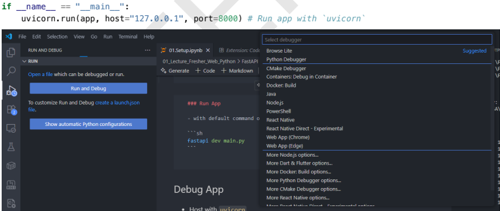
Running the Application:
# Development mode
uvicorn main:app --reload

# Or
fastapi dev main.py
Pydantic Models:
from pydantic import BaseModel, Field

class Item(BaseModel):
    name: str = Field(..., min_length=3, max_length=50)
    description: str | None = None
    price: float = Field(..., gt=0)
    in_stock: bool = Field(default=True)

@app.post("/items/")
async def create_item(item: Item):
    return {"received": item}
Interactive Docs:
- Swagger UI:
http://127.0.0.1:8000/docs - ReDoc:
http://127.0.0.1:8000/redoc - OpenAPI Schema:
http://127.0.0.1:8000/openapi.json
3. asyncio in Python
What is asyncio?
asyncio is Python's asynchronous I/O framework, allowing you to write sequential-looking code that executes many tasks concurrently without needing multiple threads/processes.
How It Works:
- Write coroutines with
async def - Use
awaitto pause when waiting for I/O - Event loop schedules tasks efficiently
import asyncio

async def say_after(delay, msg):
    await asyncio.sleep(delay)  # Non-blocking sleep
    print(msg)

async def main():
    # Run 2 tasks concurrently
    await asyncio.gather(
        say_after(2, "Hello"),
        say_after(1, "World")
    )

asyncio.run(main())
# Output after 2 seconds:
# World (after 1s)
# Hello (after 2s)
Comparing asyncio with Threading and Multiprocessing:
| Feature | Threading | Multiprocessing | asyncio |
|---|---|---|---|
| CPU usage | No (GIL) | Yes (parallel) | No (single thread) |
| Concurrency | OS-level | OS-level | Cooperative |
| Memory | Low | High | Very low |
| I/O tasks | Good | Works | Excellent |
| CPU tasks | Inefficient | Excellent | Not suitable |
When to Use asyncio?
- ✅ Web servers, network clients
- ✅ Many concurrent I/O tasks
- ✅ Avoid thread overhead
- ✅ Scale thousands of connections
- ❌ DO NOT use for CPU-bound tasks
📖 References
Learning FastAPI
| Resource | Link | Duration |
|---|---|---|
| Official FastAPI Tutorial | fastapi.tiangolo.com | 2-3 hrs |
| Concurrency Guide | FastAPI Async/Await | 20-30 min |
| Path Parameters | Path Params Guide | 15 min |
| Query Parameters | Query Params Guide | 15 min |
Learning Checklist:
- Install FastAPI and run your first app with Uvicorn
- Explain HTTP methods, request-response cycle
- Implement both
defandasync defendpoints - Define path parameters with type hints
- Add query parameters with default values
- Observe validation errors when type is wrong
- View Swagger UI
/docsand ReDoc/redoc - Check OpenAPI schema
/openapi.json - Create a mini API combining all concepts
This document provides a solid foundation on:
- OS-level concepts: File Descriptors, Sockets, Event Loop
- Python Concurrency: Threading, Multiprocessing, asyncio
- Web fundamentals: HTTP, REST, APIs
- FastAPI: Modern Python web framework
Understanding these concepts will help you build efficient and scalable APIs with FastAPI.